

Statistics show an ongoing surge in cloud migration in recent years. Public clouds allow the deployment of cutting-edge technologies bundled with several cost-saving solutions. However, to utilize the advantages of the cloud, it is critical to build the migration process from the ground up, rethink the fundamentals and open yourselves for some new doctrines.
Let us dive deep into some of the most common mistakes and miss-usages of the platform, analyze the errors and try to offer alternatives which may help to perform the cloud migration more smoothly.
What’s In, What’s Out and How
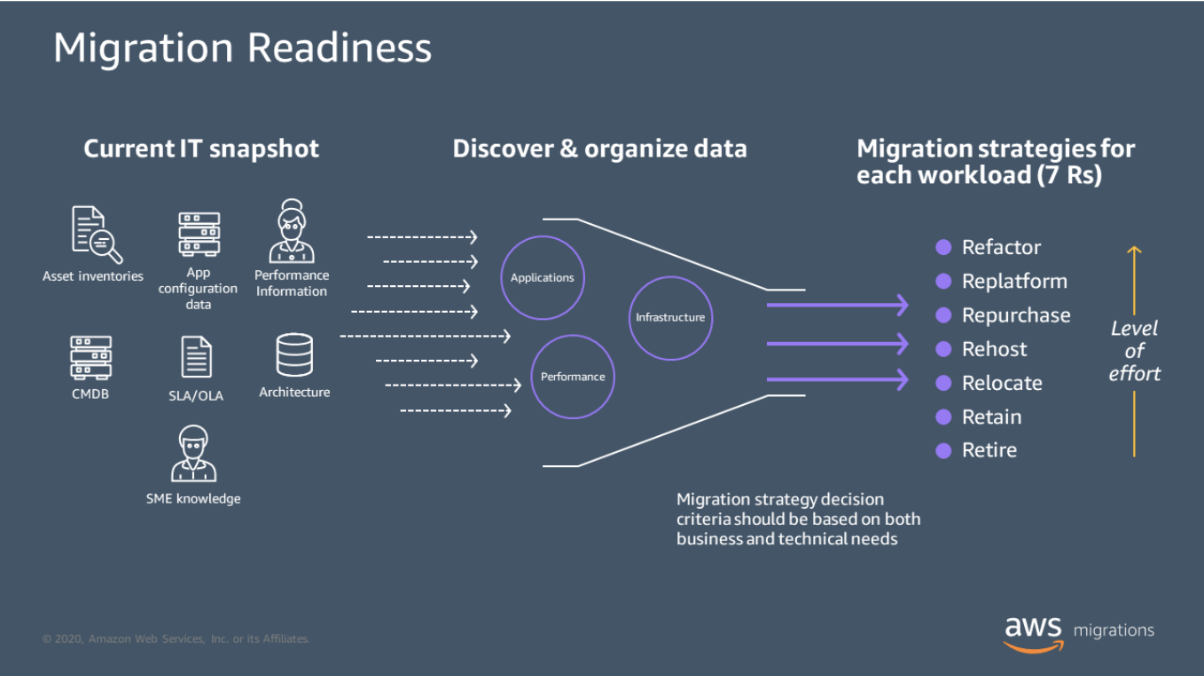
A cloud migration process should start with a discovery session to flag the organizations’ current workloads and a decision as to what should actually be migrated and what should be dropped. One of AWS’ best practices revolves around the 7 R’s principle: Refactor, Replatform, Repurchase, Rehost, Relocate, Retain, and Retire.
Building your strategy around the 7 R’s doctrine allows achieving an optimal architecture and avoiding inefficiencies costs wise.
- Refactor: Modifying and improving the application to leverage cloud capabilities fully.
- Replatform: Making minor changes to use cloud efficiencies, but not fully redesigning the app.
- Repurchase: Switching to a different product, usually a cloud-native service.
- Rehost: “Lift and shift” approach, moving applications to the cloud as they are.
- Relocate: Moving resources to a cloud provider’s infrastructure with minimal changes.
- Retain: Keeping some applications in the current environment due to various constraints.
- Retire: Eliminating unnecessary applications to streamline and focus the migration.
Starting with Sensitive Data
You may be too eager to take your sensitive data to the cloud, stripping it off your local servers quickly. That’s a mistake. Even if there’s imminent risk, a hasty migration of sensitive data could lead to bigger problems.
The first batch of data shifted to the cloud environment is like a guinea pig. Even experts understand that anything could go wrong. You want to start with less critical data so that if an issue occurs, necessary data won’t be lost. You can also anonymize a small dataset for a PoC.
Speeding the Migration Process
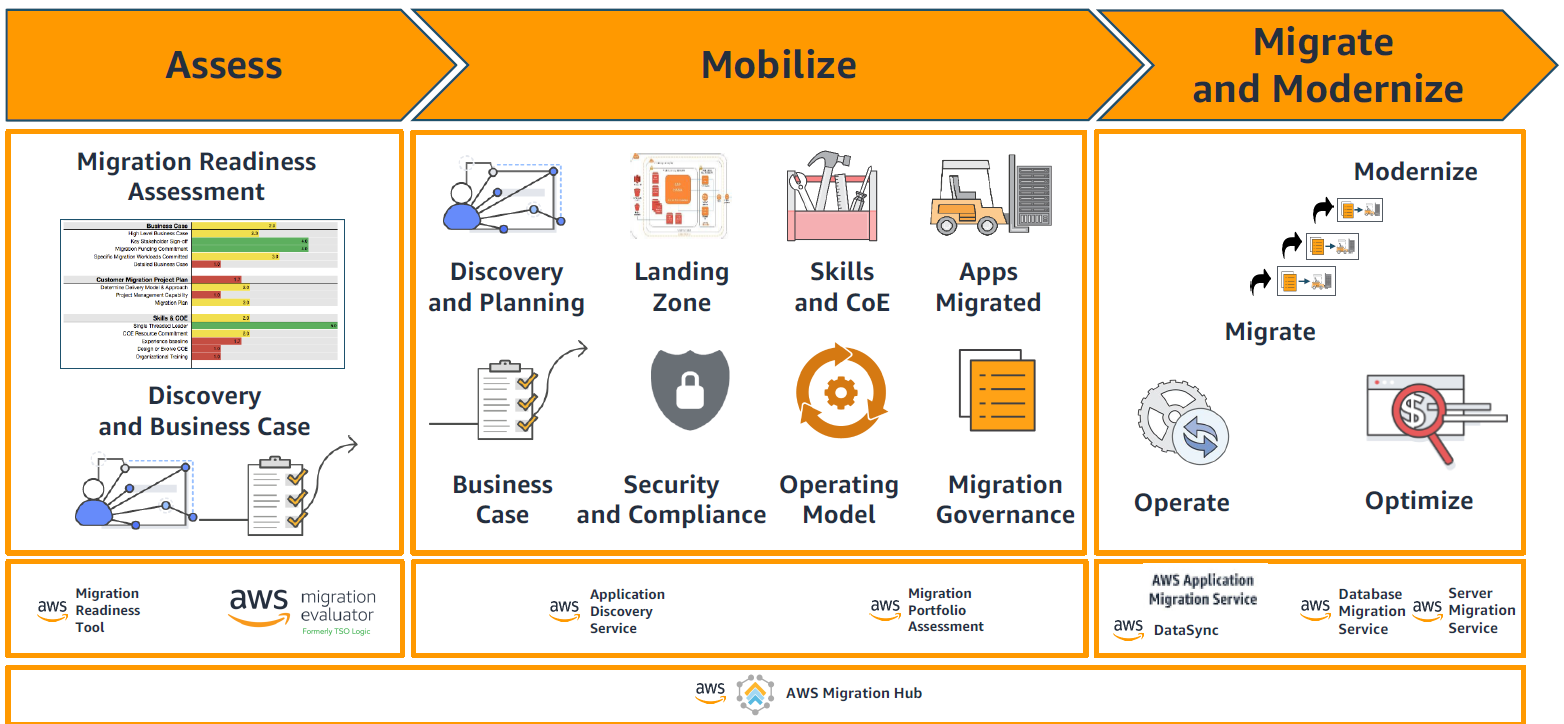
Many IT people mistake enterprise migration for the simple process of shifting to a new server. It’s more complicated than that. A Migration leader should understand that the shift is a multi-step process that involves many activities and milestones.
It is crucial to understand the type of migration we are undertaking — specifically, which of the 7 R’s we are utilizing in this migration
It would be ideal to start the migration with less critical apps, and gradually move mission-critical apps and workloads. Usually it would be ideal to start a “lift & shift” migration to the cloud and then start a refactor phase after the application was transferred, as it is simpler to change an app once it was moved to the cloud due to vertical growth. You can then figure out whether to refactor some applications. Doing the steps in phases can help you figure out ways to mitigate risk and track and fix issues.
Underestimate Costs
Companies must understand cloud migration costs before moving. Making radical cost management changes during the migration often doesn’t bode well for the project’s outcomes.
As in any other IT project, there are a number of factors to be considered such as staff training, bandwidth required for the initial sync and later – cost optimization.
Budget governance is always an elephant in the room, but with the required knowledge, you’ll be able to build the path for a successful cloud journey.
Data Security
Data security always comes up when first thinking of cloud migration – can we protect our data? Can we build a BCP/DRP when we talk about the cloud?
Obviously the short answer is yes… the long answer is that you probably use cloud services in some of your most intimate corporate services such as emails, data sync & share, etc.
All regulations and requirements can be implemented over the cloud. It is important to pre-build your cloud architecture to align with regulatory demands such as GDPR, HIPAA, or SOC. Solutions and architectural best practices for these regulations are publicly available to help in this process.
Forgetting the Network
It’s a mistake to think only about the hardware and software and forget the network during cloud migration. The network is important because it facilitates the data migration, your day-to-day cloud experience and data security. For a successful cloud migration, you must optimize the network that will allow you to access all apps and data after the migration. It must be secure and maintain high-performance to ensure a smooth transfer.
Engage with your teams and experts to determine security, accessibility, and scalability needs. It would be best to analyze current network performance and vulnerabilities before jumping in with both feet.
Inefficient Testing
Testing the cloud infrastructure for security stability, performance, scalability, interoperability etc., will allow a better project delivery. A correct testing plan will help you avoid mistakes that can create an issue with the planned resources for the project.
After cloud migration, applications may require reconfiguration to operate smoothly. Additionally, as some team members might not be familiar with all the new features, thorough testing is essential to ensure seamless service functionality.
Not Training Staff
Some of the risks associated with untrained employees during the migration process include accidental data leaks and misconfigurations.
But keep in mind that migration training is not a single-day event. You must continually upskill and reskill your teams on cloud security, performance, and cloud capabilities. Document new SOPs for them and set best practices that align with your goals for the migration.
Get in Touch
Cloudride is committed to helping enterprises move to the cloud seamlessly. We will help you cut costs, improve migration security, and maximize the business value of the cloud. Our team is consisted of migration experts who are also qualified AWS partners. Contact us to request a consultation.


