

TL;DR
Kiro IDE is an AWS-powered development platform built for teams that prioritize production standards over rapid prototyping. While tools like Cursor or Copilot focus on “chat-to-code,” Kiro enforces a Spec-Driven approach, requiring structured requirements and architecture designs before implementation begins.
Why It’s Different
- Spec-Driven Development: It’s the only AI tool that natively turns prompts into
requirements.md,design.md, andtasks.mdfiles, ensuring every code change has a traceable “paper trail.” - Conditional Steering: Team rules (like “use TypeScript strict mode”) load automatically based on the file type you’re editing, keeping the AI focused without wasting context.
- Automated Quality Hooks: It runs security scans, linters, and tests automatically on every file save, acting as a built-in senior reviewer.
- Unified Ecosystem: One configuration powers a VS Code-compatible IDE, a powerful CLI for terminal work, and an autonomous agent that handles backlog tasks in the background.
- Deep AWS Context: Features native “Powers” for AWS pricing, documentation, and architecture diagramming, making it a powerhouse for cloud-native teams.
The Bottom Line
Kiro is built for governance and consistency. It might feel slower than chat-first tools because it demands documentation up front, but it eliminates “vibe-based” coding errors and ensures a junior developer’s output matches a senior’s standards.
About a year ago, I started looking for an AI coding tool that could actually work for our team. Not just “generate code from a prompt”. I needed something that would keep our standards consistent across projects, create documentation automatically, and not require me to explain our conventions in every single chat session.
I tried most of them. I chose Kiro. Here’s why, and here’s exactly how we set it up.
What Is Kiro IDE and What Makes It Different From Other AI Coding Tools?
Kiro is an agentic AI development platform from AWS. You get three things that share the same configuration:
- Kiro IDE — a VS Code-compatible editor with AI baked into the whole development lifecycle
- Kiro CLI — a terminal agent for when you’re SSH’d into a server or want to script things
- Kiro Autonomous Agent — a background agent that works on tasks independently and opens PRs for you
The Kiro sign-in screen. If you’ve used VS Code, you’ll feel right at home.
Here’s the thing that sold me: Kiro is the only AI coding tool with spec-driven development built in. I’ve looked at Claude Code, Cursor, Copilot, Windsurf, Gemini CLI, and Antigravity — none of them do this natively. They’re all chat-first: you type a prompt, the AI writes code, you iterate. That works fine for prototyping, but when you’re building production systems for clients, “just vibe it” doesn’t cut it.
With Kiro, your prompt turns into structured requirements, then a system design, then discrete implementation tasks — all before any code gets written. Every decision is documented. Every requirement is traceable. When a client asks six months later, “Why did you build it this way?”, the answer is sitting right there in the repo.
For a consulting company, that’s not a nice-to-have. That’s the whole point.
How Does Kiro’s Spec-Driven Development Work in Practice?
When you open a new session, Kiro asks you a simple question: Vibe or Spec?
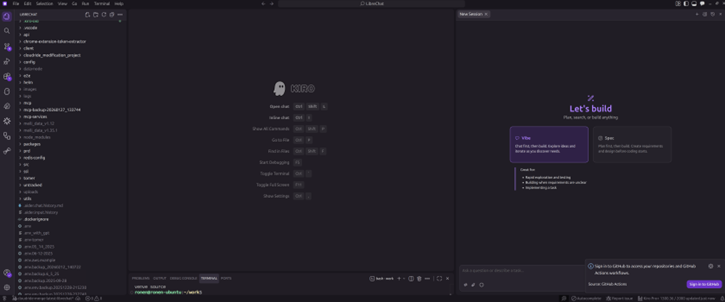
Vibe for exploration, Spec for production work. You pick based on what you’re doing.
Vibe is basically how every other AI tool works — chat, code, iterate. I use it for quick experiments, internal tools, throwaway scripts. It’s fast and loose, and that’s fine when you don’t need a paper trail.
Spec is where Kiro earns its keep. You describe what you want to build, and Kiro walks you through a structured process:
- requirements.md — user stories with acceptance criteria, written in EARS notation. Not vague bullet points — actual testable requirements.
- design.md — system architecture, sequence diagrams, error handling strategy. The kind of document you’d normally spend a day writing.
- tasks.md — discrete implementation tasks with dependencies. Each one is trackable, and Kiro updates their status as it works through them.
There are two flavors: Feature Specs for new capabilities (choose requirements-first or design-first), and Bugfix Specs for diagnosing and fixing bugs without breaking other things. The bugfix specs are surprisingly good — Kiro analyzes current behavior vs. expected behavior vs. what should stay unchanged, then generates a surgical fix plan.
The spec artifacts live in your repo as markdown files. They become your project documentation for free. I can’t overstate how much time this saves us.
Is Kiro Autopilot Mode Safe to Use? Autopilot vs. Supervised Mode Explained
This was my first concern too. Letting an AI agent modify code autonomously sounds risky. But Kiro handles it well.
Autopilot (the default) lets Kiro work through tasks end-to-end — creating files, editing code across multiple locations, running commands. You’re not babysitting every step. But you’ve always got an escape hatch: view all changes in a diff, revert everything with one click, or restore to any checkpoint.
Supervised mode is for when you want to review every change. Kiro pauses after each edit and shows you the changes as individual hunks. You can accept some, reject others, or start an inline conversation about a specific change. It’s great for sensitive codebases or when you’re onboarding someone new and want them to see how the AI thinks.
In practice, I run Autopilot for spec execution — once I’ve reviewed and approved the requirements and design, I trust Kiro to implement the tasks. I switch to Supervised for anything touching authentication, billing, or infrastructure that’s already in production.
→ Kiro autopilot documentation
What Are Kiro Steering Files and How Do They Enforce Team Standards?
This is the feature that made me stop evaluating other tools.
Steering files are markdown documents that give Kiro persistent knowledge about your project. Coding standards, architectural patterns, security policies, naming conventions — whatever your team cares about. You write them once, and Kiro follows them in every conversation. No more “remember, we use camelCase” at the start of every session.
Other tools have something similar — Claude Code has CLAUDE.md, Cursor has .cursorrules — but they all load everything, every time. Kiro has inclusion modes that control when each file loads:
| Mode | When It Loads | How We Use It |
| always | Every single interaction | Security policies, coding standards |
| fileMatch | Only when you’re working with matching files | React rules load for *.tsx, CDK rules for *Stack.ts |
| manual | When you explicitly reference it in chat | Migration guides, troubleshooting runbooks |
| auto | When your request matches the file’s description | API design patterns activate when you’re building endpoints |
This matters more than you’d think. When you have 11 steering documents (we do), loading all of them every time wastes context and confuses the agent. With fileMatch, our React best practices only load when we’re actually touching React files. Our CDK patterns only show up when we’re working on infrastructure. The agent stays focused.
We keep 11 global steering files in ~/.kiro/steering/ that apply to every project: AWS CLI, CDK, Docker, Git, Security, Testing, TypeScript, Python, React, MCP, and Development Standards. Project-specific overrides go in .kiro/steering/ at the workspace level.
Kiro also picks up AGENTS.md files automatically — that’s the open standard that works across multiple AI tools.
How to Automate Code Quality Checks with Kiro Agent Hooks
Hooks are probably the feature my team appreciates most day-to-day. They’re event-driven automations — when something happens in your IDE (file save, dependency change, manual trigger), Kiro runs a predefined action.
We have 8 hooks that fire automatically on file save:
| Hook | What It Does |
| Auto Test on Save | Runs relevant tests with –silent flags |
| Lint and Format on Save | ESLint/Prettier for JS/TS, flake8/Black for Python |
| Security Scan on Dependency Change | Audits package files when dependencies change |
| CDK Synth on Change | Validates CDK code and runs synthesis |
| Docker Validation | Checks Dockerfiles for security and best practices |
| MCP Config Validation | Validates MCP server configs |
| Environment File Validation | Catches secrets in .env files |
| API Schema Validation | Validates OpenAPI/GraphQL schemas |
Plus 6 manual hooks you trigger from a button: commit message generator, spell checker, MCP server tester, dependency updater, coverage analyzer, and performance profiler.
The beauty is that nobody has to remember to run these. Save a file, the hooks fire. A junior developer gets the same quality gates as a senior one. And because the hooks live in the .kiro/ directory, they’re version-controlled and shared across the team.
Kiro Best Practices Boilerplate: Our Open-Source Team Configuration
We packaged all of our steering files, hooks, and MCP config into a single repo that any team can drop into their project: kiro-best-practices.
11 steering documents. 17 hooks. MCP server configuration. One command to install:
cd your-project
mkdir -p .kiro && curl -L https://github.com/awsdataarchitect/kiro-best-practices/archive/main.tar.gz \
| tar -xz –strip-components=2 -C .kiro kiro-best-practices-main/.kiro
New project? New team member? Same guardrails from commit zero.
→ kiro-best-practices on GitHub
How to Set Up MCP Servers in Kiro for AWS, Jira, and More
MCP (Model Context Protocol) is how you connect Kiro to external tools. Think of it as giving your AI agent access to your organization’s services without modifying the agent itself.
We run 10+ MCP servers, all containerized via Docker Compose so the setup is reproducible:
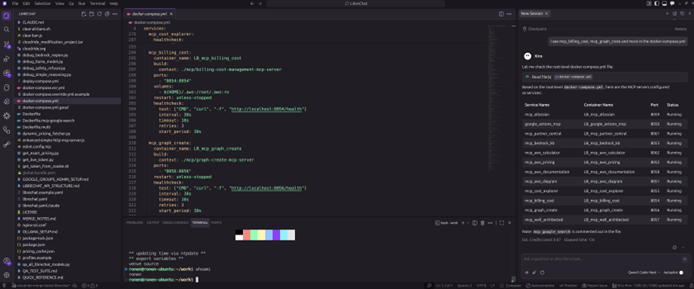
Kiro reading our docker-compose.yml and listing every MCP service with its port and status. This is a real screenshot from our setup.
Here’s what we have running globally:
| Server | What I Actually Use It For |
| aws_documentation | “How does X work in AWS?” without leaving the editor |
| aws_pricing | Quick pricing lookups during architecture decisions |
| cost_explorer | Analyzing client AWS spend right from the chat |
| well_architected | Running Well-Architected checks on designs |
| bedrock_kb | Querying our internal knowledge bases |
| atlassian | Creating Jira tickets and pulling Confluence docs |
| google_actions | Calendar, Docs, Sheets, Gmail — all from the chat |
| aws_diagram | Generating architecture diagrams on the fly |
| graph_create | Charts and visualizations for reports |
| partner_central | AWS Partner Central interactions |
The workflow that sold my team: I’m in a Kiro session designing an architecture. I ask it to check AWS pricing for the services I’m considering. Then I ask it to create a Jira epic with the tasks. Then I ask it to generate an architecture diagram. All without switching windows. That’s the MCP advantage.
What Are Kiro Powers and Why Do They Matter for Large Projects?
Here’s a problem I hit early on: I connected five MCP servers, and suddenly Kiro was loading 100+ tool definitions before I even typed my first prompt. That’s 50,000+ tokens — nearly half the context window — eaten up by tool descriptions the agent might never use.
Powers fix this. A power bundles an MCP server, steering files, and hooks into one package that activates only when relevant. Mention “payment” in your conversation? The Stripe power loads. Switch to database work? Supabase activates, Stripe deactivates. Your context stays clean.
There are 50+ partner powers now:
| Category | Examples |
| Design | Figma, Miro, Design System |
| Development | AWS Amplify, Firebase, Supabase, Neon |
| Infrastructure | Terraform, AWS CDK, AWS SAM, ECS Express |
| AI/Agents | Strands SDK, Bedrock AgentCore, Pydantic AI |
| Deployment | Netlify, Harness, Depot |
| Observability | Datadog, Dynatrace, AWS CloudWatch, Hud |
| Security | Snyk, Checkmarx, SonarQube, IAM Policy Autopilot |
| Payments | Stripe, Checkout.com |
| Testing | Postman, Nova Act (browser automation), ScoutQA |
| Migration | GCP-to-AWS, Arm SoC, Graviton, AWS Transform |
All free. One-click install. And you can build your own and share it via a GitHub repo.
→ Browse Kiro powers · Powers documentation
Kiro Skills vs. Steering vs. Powers: Which One Should You Use?
I got confused by this at first, so let me save you the trouble.
Steering = your team’s rules. Always loaded (or conditionally loaded). “We use TypeScript strict mode. We follow conventional commits. We never use var.” These are Kiro-specific.
Skills = portable instruction packages. They follow the open Agent Skills standard, so they work across multiple AI tools. They load on-demand when your request matches their description. Good for reusable workflows like “PR review checklist” or “security audit process.”
Powers = the full package. MCP tools + steering + hooks bundled together. They activate dynamically based on conversation keywords. Use these when you need both tools and guidance for a specific technology.
| Steering | Skills | Powers | |
| What it is | Team rules in markdown | Portable instruction packages | MCP + steering + hooks bundle |
| When it loads | always, fileMatch, manual, auto | On-demand by description match | Dynamic by conversation keywords |
| Works across tools | Kiro only | Yes (open standard) | Kiro only |
| Best for | Project standards | Reusable workflows | Technology integrations |
We use all three. Steering for team-wide standards, skills for our PR review process, powers for tool integrations like Terraform and Datadog.
Kiro CLI Review: Terminal AI That Shares Your IDE Configuration
I spend a lot of time in the terminal — SSH sessions, CI/CD debugging, quick fixes on servers. Kiro CLI gives me the same agent capabilities I have in the IDE, right in my shell.
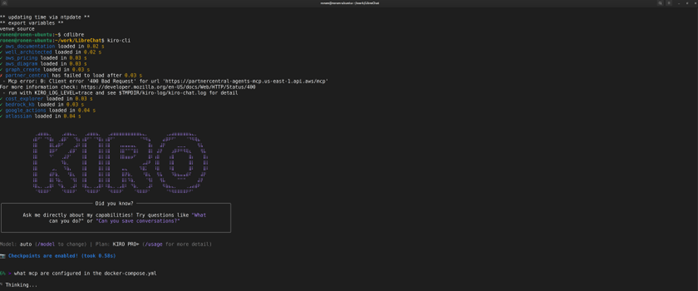
Kiro CLI loading all 10 of our MCP servers in under a second. You can see the model (Auto), plan (Pro+), and checkpoints enabled.
The features I use most:
- Code Intelligence — LSP for 18 languages. /code init gives you semantic search, go-to-definition, and find-references. No setup beyond that one command.
- Custom Agents — pre-approve specific tools, limit access, and include context automatically. I have one for “AWS infrastructure” that pre-approves all AWS CLI tools and loads our CDK steering.
- Subagents — spin up parallel agents for independent subtasks. Up to 4 at once, each with its own context.
- Planning Agent — Shift+Tab toggles a read-only mode that explores your codebase without changing anything. I use this before every big refactor.
- Headless Mode — run Kiro in CI/CD pipelines with API key auth. We use it for automated code reviews on PRs.
Our CLI config (~/.kiro/settings/cli.json):
{
“chat.enableCheckpoint”: true,
“chat.enableCodeIntelligence”: true,
“chat.enableKnowledge”: true,
“chat.enableSubagent”: true,
“chat.enableThinking”: true,
“chat.enableTodoList”: true,
“chat.showContentUsage”: “Detailed”
}
Install it anywhere:
curl -fsSL https://cli.kiro.dev/install | bash
Kiro Autonomous Agent: Background AI That Opens Pull Requests
This one’s still in preview, but it’s already changing how I think about task delegation.
The autonomous agent is completely separate from the IDE and CLI. You assign it a task from kiro.dev or your Git provider (GitHub, GitLab, Bitbucket), and it works in an isolated sandbox — planning, coding, testing, and eventually opening a pull request for your review. It never merges anything automatically.
What makes it genuinely useful:
- It works while you work. I assign backlog items to the agent in the morning and review PRs in the afternoon.
- Multi-repo changes. Need to update a shared library and all the services that consume it? One task, coordinated PRs.
- It learns from your feedback. Code review comments shape how it approaches future tasks. Over time, it starts matching your team’s patterns.
- Integrations. Jira, Confluence, Bitbucket, GitLab, GitHub, Teams, Slack.
Available for Pro, Pro+, and Power users. No extra cost during preview.
→ Kiro autonomous agent documentation
Kiro Chat Context Providers: How to Give the Agent the Right Information
One thing I appreciate about Kiro’s chat is how explicit you can be about context. Use # to pull in exactly what the agent needs:
| Provider | What It Does |
| #codebase | Let Kiro find relevant files automatically |
| #file | Point to a specific file |
| #folder | Include a whole directory |
| #git diff | Show current Git changes |
| #terminal | Feed in recent terminal output (great for debugging) |
| #problems | All errors/warnings in the current file |
| #url | Pull in web documentation |
| #steering | Load a specific steering file |
| #spec | Reference an entire spec (requirements + design + tasks) |
| #mcp | Use MCP tools and resources directly |
You can combine them: #codebase #auth.ts explain how authentication works with our database
The #terminal one is a lifesaver for debugging. Kiro reads your actual terminal output — build errors, test failures, stack traces — and gives you targeted fixes instead of generic advice.
Kiro Models and Pricing: What Does It Actually Cost in 2026?
Kiro defaults to Auto a model router that picks the best model for each task. It delivers Sonnet 4-class results at the lowest credit cost. For most work, this is what you want.
When you need more horsepower, you can switch models mid-conversation:
| Model | Context | Credit Cost | When I Use It |
| Auto | — | 1.0x | Daily work, 90% of my usage |
| Claude Opus 4.6 | 1M | 2.2x | Complex architecture, large codebase refactors |
| Claude Sonnet 4.6 | 1M | 1.3x | When I need more than Auto but Opus feels expensive |
| Claude Haiku 4.5 | 200K | 0.4x | Quick questions, simple fixes |
| MiniMax M2.5 | 200K | 0.25x | Near-Opus quality at a quarter of the cost |
| Qwen3 Coder Next | 256K | 0.05x | Long exploratory sessions where I want to burn minimal credits |
Plus Opus 4.5, Sonnet 4.5, Sonnet 4.0, GLM-5, DeepSeek 3.2, and MiniMax M2.1. Twelve models total.
Every prompt shows real-time credit usage, so there are no surprises.
Kiro Pricing Plans (April 2026)
| Plan | Price | Credits/month | Overage |
| Free | $0 | 50 | — |
| Pro | $20/month | 1,000 | $0.04/credit |
| Pro+ | $40/month | 2,000 | $0.04/credit |
| Power | $200/month | 10,000 | $0.04/credit |
New signups get 500 bonus credits for the first 30 days. Powers are free on all plans. One subscription covers IDE + CLI + ACP-compatible IDEs (JetBrains, Eclipse, Zed). Enterprise plans available with SSO, centralized billing, and usage analytics.
What VS Code Extensions Work with Kiro IDE?
Kiro is built on Code OSS, so most Open VSX extensions just work. Here’s what we run:
| Extension | Why |
| Prettier | Auto-formatting |
| ESLint | Linting |
| Tailwind CSS | CSS IntelliSense |
| Pretty TS Errors | Makes TypeScript errors actually readable |
| Conventional Commits | Standardized commit messages |
| Amazon Nova Act | Browser automation for QA testing |
If you’re coming from VS Code, Kiro imports your settings, themes, and plugins during onboarding. Took me about two minutes to feel at home.
Is Kiro Secure? Privacy and Security for Enterprise Teams
This matters to us because we handle client infrastructure. Kiro is an AWS application — it follows the shared responsibility model.
The security features I care about:
- Autopilot vs. Supervised mode — you choose how much autonomy the agent gets
- Trusted commands — whitelist which commands Kiro can run without asking (I keep this tight)
- Checkpoints — roll back to any previous state, including context
- Workspace isolation — sensitive projects stay in separate workspaces
- No training on your code — enterprise-grade data protection
- AWS IAM Identity Center — SSO for enterprise teams
My advice: use temporary AWS credentials, use named profiles to isolate access, and don’t put * in your trusted commands list unless you really mean it.
Our Complete Kiro Setup: What the Configuration Actually Looks Like
Here’s the full picture — this is what every developer at CloudRide has:
~/.kiro/ # Global (all workspaces)
├── steering/ # 11 best-practice documents
│ ├── aws-cli-best-practices.md
│ ├── cdk-best-practices.md
│ ├── development-standards.md
│ ├── docker-best-practices.md
│ ├── git-best-practices.md
│ ├── mcp-best-practices.md
│ ├── python-best-practices.md
│ ├── react-best-practices.md
│ ├── security-best-practices.md
│ ├── testing-best-practices.md
│ └── typescript-best-practices.md
├── settings/
│ ├── mcp.json # 10 MCP servers
│ └── cli.json # CLI feature flags
├── extensions/ # VS Code-compatible extensions
├── agents/ # Custom agent configs
├── powers/ # Installed powers
└── skills/ # Agent skills
your-project/.kiro/ # Per-workspace (from boilerplate)
├── steering/ # Project-specific overrides
├── hooks/ # 17 automated hooks
└── settings/
└── mcp.json # Project-specific MCP servers
Global config comes from our shared dotfiles. Project-level stuff comes from the kiro-best-practices boilerplate. New developer joins? Clone the dotfiles, install the boilerplate, and they’re working with the same guardrails as everyone else.
Kiro vs. Cursor vs. Claude Code vs. Copilot: Why We Chose Kiro
I’ve used all of them. They’re all good tools. But they solve different problems.
After going through murphye’s comprehensive comparison of every major AI coding tool, here’s what stood out:
Kiro is the only tool with native spec-driven development. That’s not marketing — it’s literally the only one. Every other tool is chat-first. Kiro is the only one that structures your intent into requirements → design → tasks before writing code.
| What Matters to Us | Kiro | The Rest |
| Spec-driven development | ✅ Only tool with this | ❌ Nobody else does it natively |
| Conditional steering (fileMatch, auto) | ✅ Smart context loading | ⚠️ Others load everything every time |
| Powers (dynamic MCP bundles) | ✅ 50+ partners | ❌ Unique to Kiro |
| Event-driven hooks | ✅ | ✅ Claude Code, Cursor, Copilot have these too |
| Autonomous background agent | ✅ Preview | ✅ Cursor and Copilot have similar features |
| Subagents | ✅ Up to 10 | ✅ Claude Code, Cursor (up to 8) |
| Enterprise (AWS IAM, SSO) | ✅ | Varies |
I’ll be honest about where others win: Claude Code has deeper reasoning with Opus 4.6 and 1M context. Cursor is faster with sub-200ms completions and 8 parallel cloud agents. Copilot is cheaper at $10/mo with the widest editor support. Gemini CLI is free.
But when you need to show a client why something was built a certain way, when you need every developer on the team following the same patterns, when you need automated quality gates that fire on every save — that’s where Kiro pulls ahead. Spec-driven development means every feature has documented requirements, a reviewed design, and traceable tasks. No other tool gives you that.
Should Your Team Use Kiro? The Bottom Line
Look, Kiro isn’t perfect. Session performance can degrade after weeks of heavy use. Credit consumption is variable, which makes budgeting harder than flat-rate tools. The autonomous agent is still in preview with weekly limits.
But here’s what it gives us that nothing else does:
- Spec-driven development — the only AI tool that documents requirements and design before writing code
- Smart steering — conditional context loading so the agent stays focused instead of drowning in rules
- Automated quality gates — 17 hooks that enforce security, linting, testing, and validation on every save
- Deep AWS integration — pricing, docs, Well-Architected, cost analysis, Bedrock knowledge bases, all in context
- Three surfaces, one config — IDE, CLI, and autonomous agent all share steering, MCP, and settings
- 50+ Powers — Figma, Terraform, Stripe, Datadog, and more, loaded only when relevant
- 12 models — from Opus 4.6 for deep reasoning to Qwen3 at 0.05x cost for long sessions
For a consulting team that ships production code for clients, the combination of structured specs, team-wide governance, and automated quality checks is worth more than raw generation speed. We spend less time explaining context to the AI and more time shipping.
If that sounds like your situation, give it a shot. The free tier has 50 credits — enough to run through a spec or two and see if the workflow clicks for you.
Ronen Amity is the CTO of Cloudride, an AWS Advanced Partner and AWS Reseller based in Tel Aviv. We specialize in cloud architecture, migration, DevOps, FinOps, Kubernetes, serverless, and cloud security – helping organizations from SMBs to the public sector simplify their cloud journey.
Ready to modernize your data strategy? To explore how to optimize your specific environment, reach out for an architecture review.


